
Treat a missing campfire recipe as a recipe-state problem first, not proof that the save is broken. Confirm that you obtained and learned the recipe, opened the station that owns it, and checked the required ingredients. Dimraeth separates recipe discovery, learned knowledge, crafting stations and finished items. A recipe item in storage is not the same as a learned entry, and a spellbook recipe is not automatically a cooking recipe.
The available documentation does not contain a verified list of every recipe that should appear at a campfire in the current build. It does confirm four crafting categories in the current reference—Cooking, Crafting Bench, Alchemy Table and Personal Crafting—and creator footage shows recipe items being learned, duplicated recipes being retained or sold, and some missed recipes becoming purchasable after later shop progression. Use those distinctions to locate the missing state without inventing an unlock.
Dimraeth campfire recipe checks
- Write down the exact result you expect to craft.
- Confirm the expected entry belongs to Cooking rather than another station.
- Check whether the character owns a recipe item but has not learned it.
- Learn the recipe through the normal inventory action if that option is present.
- Reopen the correct station and clear any active category or search filter.
- Compare the ingredient names with the raw items in inventory or supported storage.
- Check progression only when the recipe is known to come from a later service or area.
- Preserve screenshots and version information if the learned entry remains absent.
Do not begin by reinstalling, deleting a world or editing the save. Most checks above are reversible and provide better information.
Recipe, ingredient, station and product
Four different objects can be confused when the interface is busy:
| Layer | Meaning |
|---|---|
| Recipe item | An object that can teach crafting knowledge |
| Learned recipe | Knowledge registered to the character or relevant progression state |
| Crafting station | The interface that produces the result |
| Finished item | The food, tool, potion, book or material created by the recipe |
A creator demonstrates that a world spellbook location can teach a recipe for making the book rather than directly granting the usable spell. Cooking follows the same general need to distinguish knowledge from product, even though the station and ingredients differ. Do not assume picking up any recipe-shaped object immediately populates every crafting interface.
The Dimraeth recipes guide explains this model across all stations. Use it before treating a missing entry as campfire-specific.
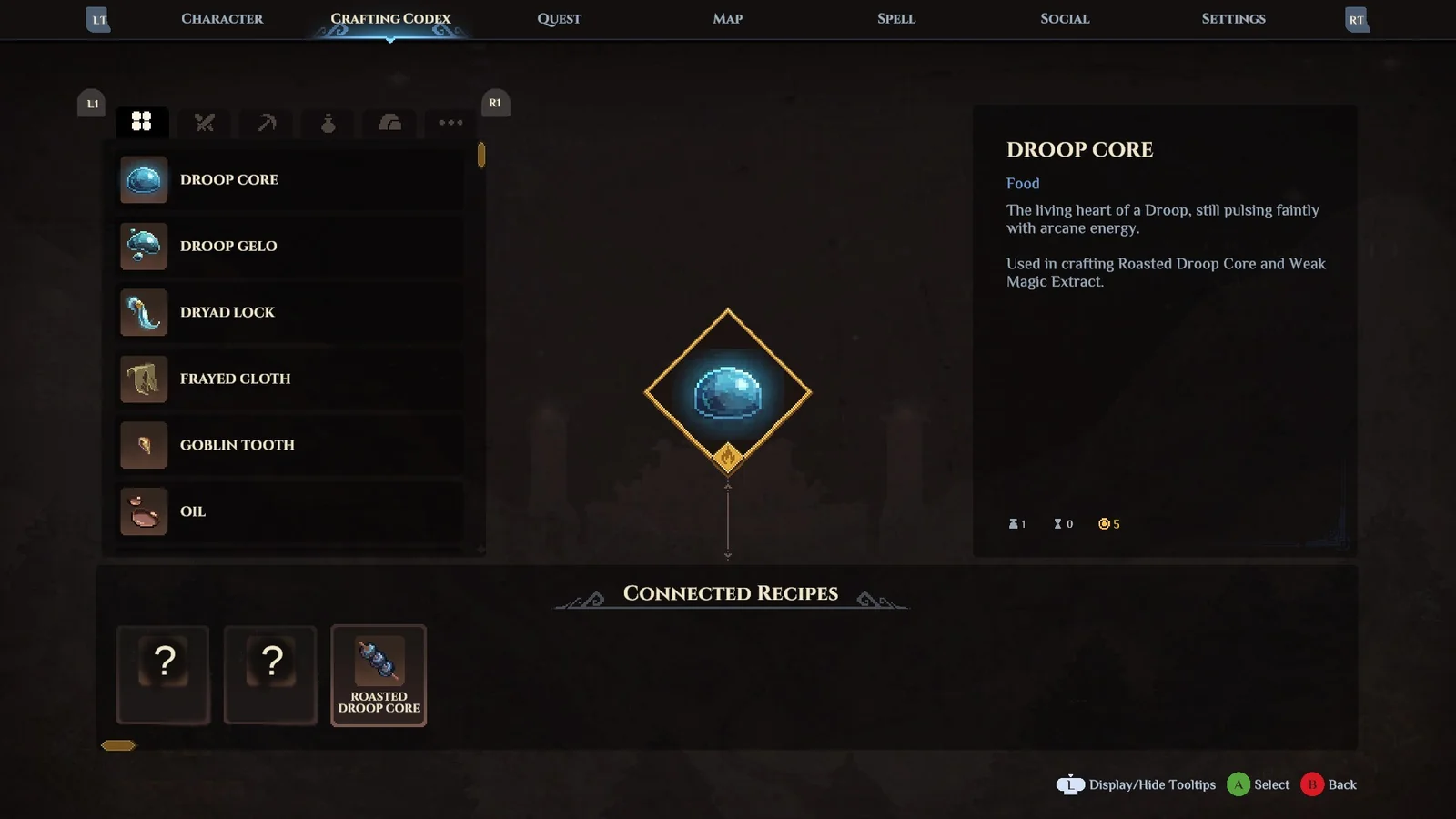
The crafting codex groups learned production knowledge. Read the category and station before searching for the same entry at a campfire.
The station assignment check
The current crafting reference groups recipes under Cooking, Crafting Bench, Alchemy Table and Personal Crafting. That means a valid recipe can be absent from one interface because it belongs to another. Pinewood Planks, for example, are associated with the Crafting Bench, while potions belong to Alchemy and simple items can belong to Personal Crafting.
For food, verify that the interface is actually the Cooking station expected by the current build. A campfire can also participate in resting or training in recorded gameplay, and those interactions should not be treated as a complete recipe catalogue. If the campfire presents more than one interaction, select the cooking function before looking for the item.
Do not copy a station assignment from another survival game. Several unrelated online pages concern Dark and Light, Stardew Valley, Palia and The Long Dark. Their missing-recipe fixes, progression gates and ingredient rules do not apply to Dimraeth.
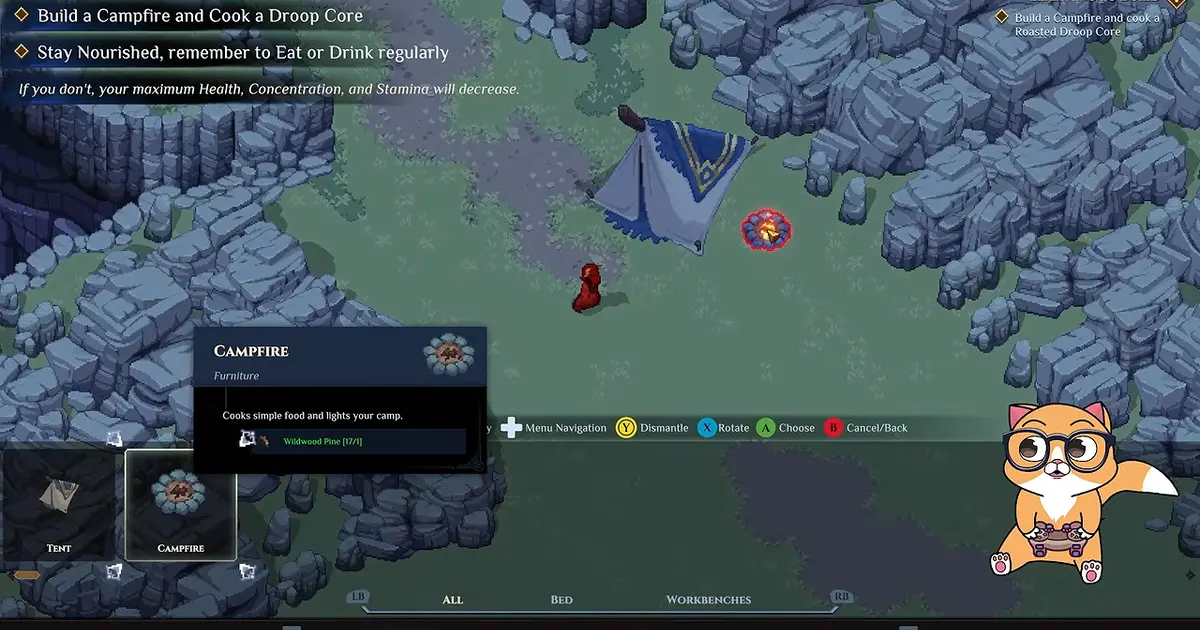
The Campfire is a distinct Sanctum structure; confirm that its cooking function is the station expected by the recipe.
Learned recipe state
Creator footage advises learning recipe items when they drop. It also notes that a duplicate can be saved for another character or sold. That distinction implies the inventory object and learned state can coexist as separate possibilities: if “Learn” is still available, the item may not yet have registered as knowledge for this character.
Open the relevant inventory entry and read the available action. Use the normal learning control once. Then close and reopen the crafting interface rather than repeatedly activating the item. If the item is identified as already known, keep it separate from the troubleshooting stack and move to station and filter checks.
Do not consume, sell or discard the only copy before confirming the learned state. The evidence does not establish an automatic recovery service for a lost one-off recipe. A duplicate policy for one creator is not proof that every recipe can be reacquired instantly.
Filters and interface state
A recipe can be present but hidden by a category, search term, craftable-only toggle or scroll position. The supplied excerpts do not document the exact current controls, so this guide does not prescribe labels that may not exist. Instead, return the interface to its broadest visible list: clear text input, select the all or cooking category if available, and inspect the full list.
Compare three states. A visible but grey entry usually indicates a different problem from a completely absent entry. A visible entry with unmet ingredients is not missing. An absent entry after confirmed learning and correct station selection is the state worth recording as a possible defect.
| Interface state | Next check |
|---|---|
| Entry visible and craftable | No missing-recipe problem |
| Entry visible but unavailable | Read ingredient or progression requirements |
| Entry hidden under a filter | Clear the filter and reopen the category |
| Entry absent, recipe not learned | Learn or acquire the recipe |
| Entry absent, learned state confirmed | Record version, character and station for a bug report |
Ingredient visibility is not recipe visibility
Missing ingredients should not normally erase the conceptual distinction between owning a recipe and being able to craft it. Read the interface: if the result is visible but materials are red, incomplete or unavailable, the recipe exists. The next task is gathering or moving the exact ingredients, not finding the recipe again.
Check raw names carefully. Critter Meat and Cooked Critter are different items. Wildwood Pine and Pinewood Planks are related through a bench recipe but are not interchangeable. A material in a private chest may also be outside whatever storage scope the station currently reads; moving one test stack into character inventory removes that uncertainty without claiming a universal pooled-storage rule.
Avoid farming a guessed ingredient until the entry or a verified source identifies it. The public record contains a partial recipe reference, not a complete current database guaranteed for every version.
Progression-gated recipe access
Some recipes can be acquired later rather than being universal starter knowledge. Creator footage says that, depending on drop luck, a player may miss certain recipes and later upgrade an item shop in the second area to buy missed ones. That is a version-scoped route described by one player, not proof that every cooking recipe appears in the same shop.
Use this as a recovery lead only after confirming the item is actually part of that vendor pool. Continue normal quests, develop the relevant service and inspect its live inventory. Do not grind random enemies for hours solely because a recipe did not appear early.
Dialogue and recruitment can also expand services in Dimraeth. If a recipe guide names a recruited NPC or upgraded shop, verify that service exists in the current world. Joining another player's developed base does not prove the service has been unlocked at home.
Current character and current world
Recipe knowledge may be encountered while switching characters or visiting another world. The available documentation does not fully define which cooking unlocks are character-owned and which depend on the world, so record both. Check the same character that learned the recipe and the world where the expected station or vendor exists.
If an alternate character sees the entry and the main character does not, the difference is more useful than a general “missing” report. If the same character sees it in one world but not another, compare station construction, recruited services and progression. Do not transfer or delete the recipe item until the ownership layer is clear.
This matters in co-op because characters can bring equipment and personal progression while world buildings and recruitment remain with the host. A borrowed station can be available even when your home world has not reached the same stage.
Campfire rest and cooking are separate
Recorded footage shows campfires participating in rest and, at points, cooking. It also notes a version where the campfire rest prompt no longer appeared. A missing rest prompt and a missing cooking entry are therefore different symptoms. Do not use a rest failure as proof that recipe knowledge disappeared.
The cannot rest in tent guide covers time-of-day and rest-prompt checks. Stay on the recipe path here: learned state, station, filters, materials and progression.
If the whole campfire interaction is unavailable, record that broader failure separately. If the cooking interface opens but one recipe is absent, the issue is narrower and the report should say so.
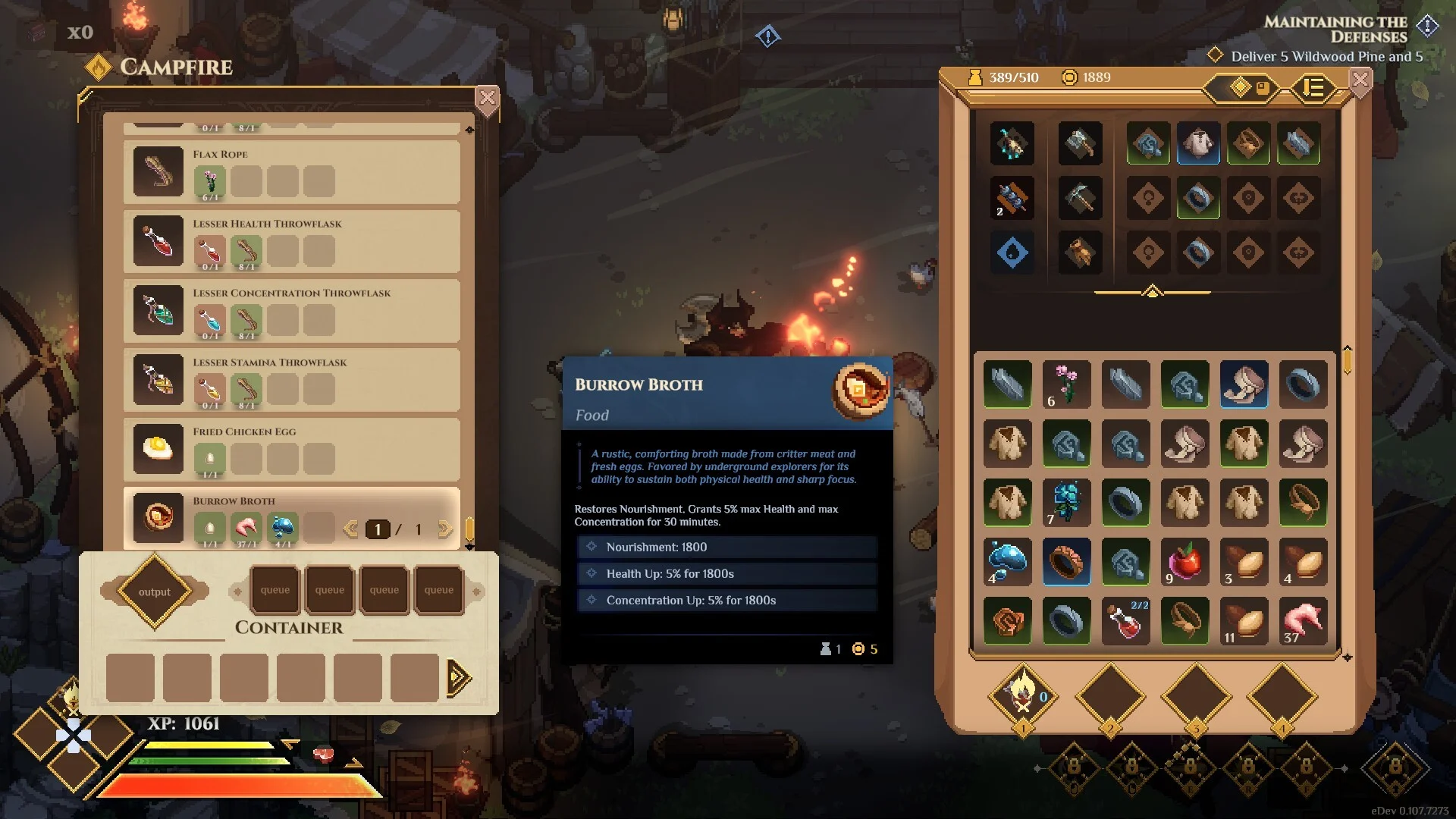
The campfire cooking interface and inventory help separate a missing recipe entry from a missing rest prompt.
Safe reload and update checks
After confirming learning and station assignment, close the crafting interface, move away from active production and save through the normal flow. Return to the menu and reload the same character and world. Reopen the station with no filter. The evidence does not guarantee this repairs anything; it is a safe refresh that avoids interrupting a save write.
Check the installed game version before comparing with a guide or report. Early Access can change unlocks, station assignments and recipe availability. A creator transcript explicitly mentions patch differences in surrounding systems. Version mismatch can explain why the same route produces different interfaces without implying either player is lying.
Do not reinstall until you have preserved the world and confirmed the problem is not simply an unlearned item or wrong station. Reinstallation is a large action with little diagnostic value for a single missing entry.
Bug-report evidence
Capture the smallest reproducible case:
- exact recipe name and expected result;
- source of the recipe item;
- screenshot showing the learned or already-known state;
- character and host world;
- station type and location;
- active filters or categories;
- relevant ingredient stacks and where they are stored;
- game version and date;
- screenshot of the full list where the entry should appear;
- whether the problem remains after a normal save and reload.
Avoid claiming that “all campfire recipes vanished” when only one named item is missing. Conversely, if the list is entirely empty, show that broader state and whether other stations still populate.
Missing recipe claims to avoid
Do not assert that a recipe is removed merely because it was not found early. Do not call it a guaranteed drop from a named enemy unless the live game or an official note confirms it. Do not import console commands, mod fixes or ingredient exploits from unrelated games.
Do not treat a video title or search snippet as game fact. Only verifiable Dimraeth gameplay supports the distinctions used here. Where the complete acquisition route is absent, this page says so rather than filling the gap.
Final recipe-state checklist
The useful diagnosis is a sentence with four parts: “This character learned recipe name, opened station name in world state, cleared filters, and the entry is still absent on version.” If one part is unknown, verify it first.
When all four are confirmed, preserve the recipe item or proof of learning and file the report. Until then, keep the categories separate. Most “missing recipe” confusion becomes solvable once recipe items, learned knowledge, station ownership and finished products stop being treated as the same thing.
Also record whether other recipes in the same category remain visible. One absent entry suggests an unlock or recipe-record problem; an empty category suggests a wider interface, station or loading problem. That distinction keeps a narrow report narrow and stops an isolated missing item from being described as the loss of the entire cooking system.
Use a comparison recipe when the list is not empty. Choose one entry that still appears at the same station and record its category, visibility and material state beside the missing entry. This establishes that the campfire interface loaded and that the filter can display at least one result. It does not prove the missing recipe should belong to the same category, so include the source that taught it and the wording shown when it was learned. If no entries appear anywhere, test another constructed station in the same world before spending materials on a second campfire. A working bench beside an empty campfire narrows the problem to the station or recipe layer; several empty stations point to a broader loading or world-state issue.