
Gear can be personal without every resource being duplicated
Dimraeth co-op players have recorded receiving their own personalized equipment drops and passing useful pieces to another player. That supports a practical way to help a friend complete a rune set: inspect your own drops, identify a piece they need, and transfer it through the available item sharing interaction.
It does not establish that every enemy resource, environmental pickup, or chest reward produces a separate copy for every player. Early Access reports describe a mixture of individually visible equipment and resources that both players can see but only one can collect. Reports also disagree about what the Personal Loot setting changes. The exact toggle behavior and any loot multiplier remain unverified.
Treat equipment allocation, resource collection, and private storage as three separate questions. A resource disappearing after your friend picks it up does not by itself prove that their personalized equipment has taken yours. Likewise, a chest permission problem does not establish how an enemy assigns its drops.
Read the drop before dividing the reward
The useful first check is the item category. Equipment is the category most clearly supported by the recorded personalized gear example. Resource sharing is the category that produced conflicting player expectations: a party could see a dropped material together, while only one person could pick it up.
Read any visible player assignment on a drop. When a friend says there was no loot, compare the same enemy and the same item. One person inspecting their equipment inventory while another checks resources can describe very different outcomes without either observation being wrong. Looking at one visible item also cannot establish the total number of items the enemy produced for everyone.
Share personalized gear after checking the slot
A recorded wolf farming run explains that friends receive their own personalized gear and can hand suitable pieces to the player collecting the set. This is especially useful for equipment sets with multiple slots: another Ring does not fill a missing Bracer, even if both belong to the desired set.
Before moving an item, compare the set name, slot, rarity, and relevant stats. A duplicate for one player can be an upgrade for another, while an apparently impressive item can still be a poor match for their damage type. Agree which player needs the piece instead of using rarity alone to decide where it goes.
Check the Personal Loot setting without assuming its effect
Early player discussions contain several incompatible explanations of the setting. One account describes personal loot as always active because of a bug. Another reports that equipment is player specific but materials remain visible to both players. A third says the party left the setting off and shared what they found. These accounts do not establish a single reliable toggle rule for the current build.
For your own party, check the setting on the hosted session and compare one controlled encounter. Keep equipment and resources separate in that comparison. Have both players identify what they can see before either collects it, then confirm whose inventory changes when a shared looking resource is collected.
Keep private chest permissions separate from enemy loot
Private chests are storage in the world, with permission behavior that has received its own fixes. The September 21 update addressed private chest access through local interaction and workbench pooled inventory. That is a storage permission change; it does not describe an enemy drop multiplier or individual resource copies.
The September 25 update further tightened private chest security on the server, fixed cases where clients could not see chests, and allowed a player's own alternate characters to open their private chests. A missing chest on a joining player's screen can therefore involve visibility or session state, rather than showing that its contents were distributed through personal loot.
The same update changes what happens when a host dismantles a guest's chest: its contents drop instead of the action being refused. Private storage consequently should not be interpreted as a promise that a host can never remove the container. The permissions on opening a chest and the host's ability to dismantle a structure are different interactions.
For a co-op group, identify which containers are intended for shared crafting resources and which belong to a particular player. Check the private or public state using the current chest interface. Do not assume that enabling personal loot on a lobby automatically makes every chest private, or that changing a chest permission changes how monsters allocate gear.
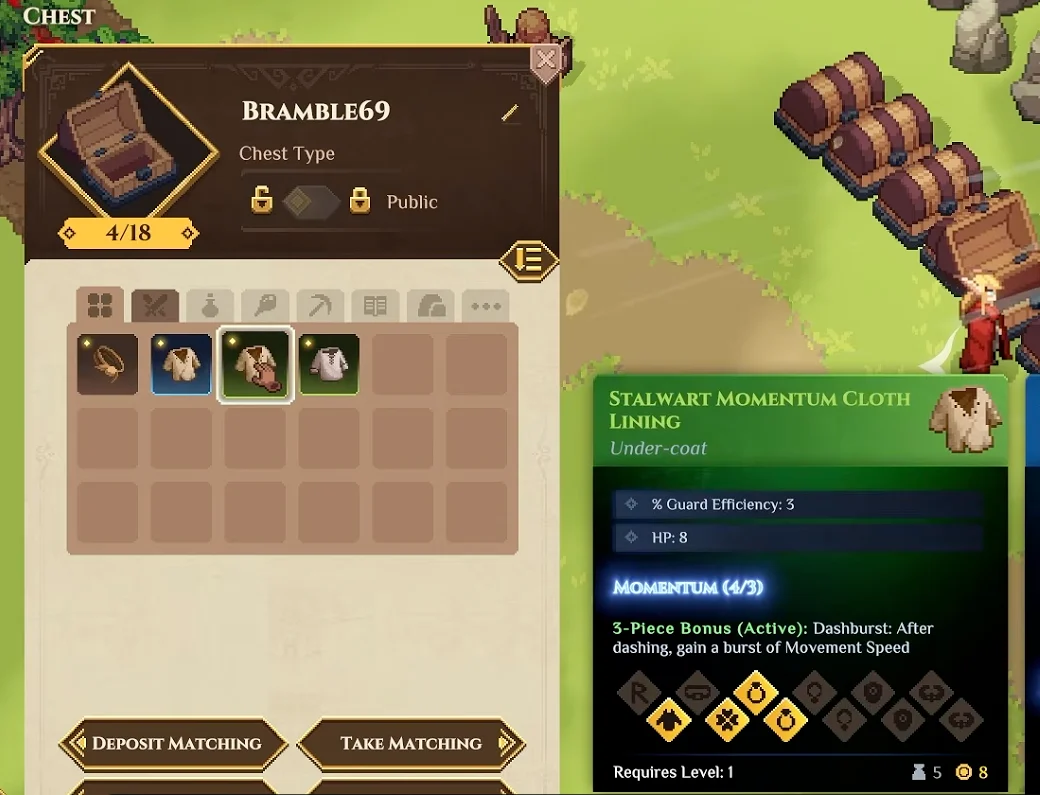
The Chest panel displays its own Public access setting above the stored equipment.
Understand what follows the character between worlds
Dimraeth's co-op structure lets a hero carry equipment, inventory, spells, levels, and personal progression between worlds. Story state, allies, and buildings belong to the world. This helps explain why carrying a received piece of gear is a different action from leaving it in a world's chest.
Resolve a disputed pickup with the item category and session state
When a party disagrees about a missing item, establish what actually happened before treating it as theft, a toggle failure, or an empty loot roll. Identify the enemy or container, the item category, the visible owner if one appears, and the player whose inventory changed. For a storage issue, add the chest permission and whether the player was host or guest.