
Download Dimraeth through its official Steam listing, app 2402680, then install the game from your Steam library. Mudtek is both the developer and publisher. The available product is the paid Windows Early Access release, which launched on September 15, 2026. A standalone official installer, complete free download, Android package or iOS edition is not established by the current distribution information.
The Steam purchase box showed $21.99 on October 9, 2026; your own current storefront determines the amount you pay. Before purchasing or downloading, check the Windows requirements and the game's Early Access status. An old announcement about a planned demo does not establish that a demo is currently available.
Find the correct game before downloading
Start from the official Steam link in this site's footer or the developer's website. The correct listing is named Dimraeth, uses app ID 2402680, and identifies Mudtek as developer and publisher. Those details give you a stronger way to recognise the game than matching a cover image copied into a search result.
- Open the official Dimraeth Steam listing.
- Match the title, app ID and Mudtek attribution.
- Read the Early Access notice and requirements.
- Review the purchase options currently shown for your account.
- Use the Steam account you intend to play with, then continue through its game-library installation controls.
Distinguish the paid game from demo claims
Dimraeth is already available in Early Access. The public demo closed on July 15, 2026. The developer described rebuilding it as necessary before a possible return; a replacement demo is not confirmed here. Check the official listing for any current demo option.
To establish a demo you can actually download, look for a current demo option on the official listing. A promise that a demo is planned, a video of an earlier playtest or a player discussing an old demo is not sufficient. None of those establishes that the same build is still publicly downloadable.
| What you are looking at | What it establishes |
|---|---|
| Current Dimraeth Steam product | The official game listing and current purchase options |
| Old planned-demo wording | A historical development intention |
| Earlier playtest footage | That someone recorded that earlier build |
| A third-party free-download claim | Only that the page makes the claim |
Check the Windows installation requirements
The Steam requirements specify Windows. Compare the actual computer you will use with that table rather than assuming a pixel-art presentation means the game has negligible hardware requirements. The minimum notes state that integrated graphics are not supported and that 4 GB VRAM is required. Listed requirements do not guarantee a particular frame rate or resolution.
| Component | Minimum shown on Steam | Recommended shown on Steam |
|---|---|---|
| Operating system | Windows 10 | Windows 10 or Windows 11 |
| Processor | Intel Core i3, fourth generation, or AMD equivalent | Intel Core i5, sixth generation, or AMD Ryzen 3 |
| Memory | 4 GB RAM | 8 GB RAM |
| Graphics | NVIDIA GeForce GTX 1650, 4 GB, or AMD Radeon RX 5500 XT, 4 GB | NVIDIA GTX 1050 Ti or AMD RX 560 or better |
| DirectX | Version 11 | Version 12 |
| Available storage | 5 GB | 10 GB |
| Network | Broadband internet connection | Broadband internet connection |
| Sound | Integrated | Integrated or dedicated |
The graphics entries appear inconsistent: the recommended examples do not form a straightforward higher tier than the minimum examples. Do not resolve that inconsistency by substituting your own GPU requirement or promising that a weaker card will work. If your hardware decision depends on those entries, ask for clarification before purchasing for that machine.
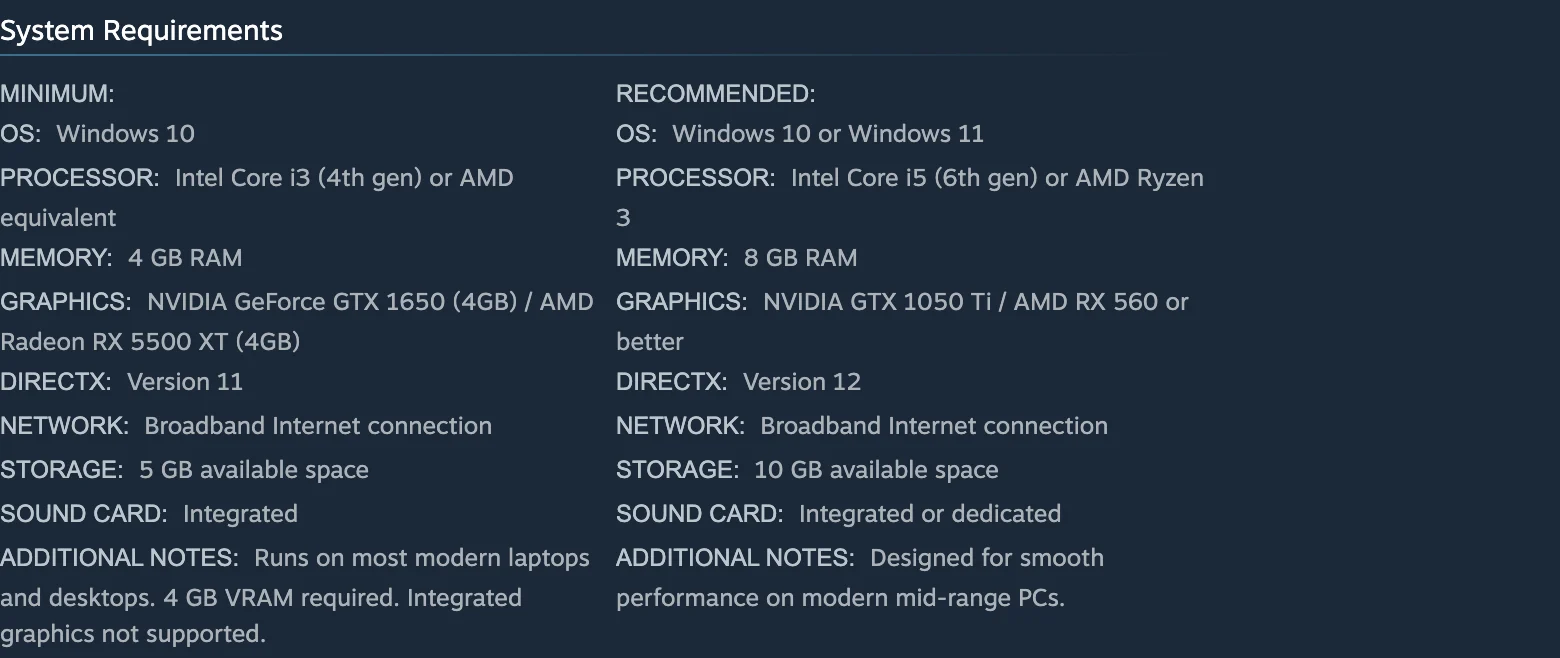
Compare the two columns as published; the graphics entries are not a measured performance ranking.
Prepare the right account and destination
Use the account you intend to keep playing with when you obtain the game. Before repeating a purchase because the title seems absent, check the account and library you have opened. Viewing a store page and seeing an installation option in your own library are different states.
Choose a destination with enough available space for the current installation requirements. Steam lists 5 GB minimum and 10 GB recommended available storage. Those figures are not a claim about the exact download-transfer size, the size of every future patch or the amount of temporary space an update will require.
Keep the installation location understandable. You should be able to identify which library destination holds the game when you later inspect updates or installed files. Avoid mixing files from an earlier demo, unofficial package or modified install into the new destination. A clean baseline makes the first launch easier to evaluate because the game being launched is the official install you just obtained.
Install through Steam and let the transfer finish
After obtaining the game through its current purchase route, find Dimraeth in your Steam library and use the installation controls there. Follow the destination and space information presented by Steam rather than a third-party guide's fixed assumption about where the files belong.
- Locate Dimraeth in the intended account's library.
- Start the installation and review its destination.
- Allow Steam to complete the download and installation work.
- Confirm the game's library entry is ready to launch.
- Start the game from that entry for the first clean test.
If the transfer stops or appears incomplete, identify the installation state before moving to gameplay troubleshooting. Check whether Steam still has work queued, whether the destination is available and whether the displayed operation has finished. Do not diagnose a gameplay crash from a transfer that never reached a completed installation.
Make the first launch a clean baseline
Launch the installed game before adding mods or external tools. Confirm that the menu is usable and that you can reach character or world selection. The purpose is practical: you want to know whether the official installation reaches the game normally before changing its environment. This is an installation check, not a claim that the Early Access build contains no bugs.
Choose your desired language from the game's available settings rather than relying on the old developer FAQ's launch-language list. Current Steam lists English, Brazilian Portuguese, Simplified Chinese, German, Russian, Latin American Spanish, Korean and Japanese interface/subtitle support. It does not mark full-audio support. Those rows describe language categories, not a promise that every piece of presentation is spoken in your selected language.
Record any error at the stage where it happens. A failure before the menu, a failed character load and an interrupted network transfer are different problems. That distinction makes the follow-up report more useful and avoids treating all three as a need for another download.
Keyboard, controllers and handheld expectations
Steam lists Full Controller Support and includes Xbox and PlayStation controllers. That allows you to consider a controller for the PC version, but it does not turn the installed product into a console edition. A PlayStation controller support label is not proof that the game can be downloaded onto a PS5.
Use the prompts displayed by your own installation to identify the controls. The movement and controls guide covers the gameplay implications after you have a working installation.
Steam Deck is listed as Playable. Playable is a specific compatibility designation and should not be rewritten as Verified. It also does not establish a native Android or iOS package. If your aim is installing on a phone, the mobile availability page addresses that separate platform question.
These are the listed Windows requirements. This page does not establish native macOS or Linux requirements, an unofficial compatibility-layer procedure or a guaranteed handheld performance profile. Keep those questions explicit instead of assuming that any device capable of opening the store can run its product.
Updates are part of the Early Access installation
The download gives you access to an actively developing game. Official news continues after the September release, so an older video or copied installer can describe a different state from the build Steam now provides. Check the current library update state before reporting a problem as though it necessarily affects the latest installation.
Steam Cloud is listed for the game, but its presence is not a guarantee that every missing character or save conflict can be repaired. Do not erase a valued local state merely because a store badge mentions cloud support. If characters are absent after an update, move to the missing-character guide and preserve the evidence needed to identify the problem.
Sort download issues from game crashes
| What you observe | First question to resolve | Next useful destination |
|---|---|---|
| The product seems absent from your library | Whether the intended account and product are open | Steam account and library information |
| Installation has not finished | Whether the transfer and destination are available | Current installation progress |
| The game closes before the menu | Whether the clean official install reproduces the failure | Crashing guide |
| A character is missing | Whether the expected character/world state is selected | Missing-character guide |
| Only a modded setup fails | Whether the clean baseline behaves differently | Mods guide |
| You expected a phone or console installer | Whether that platform has an announced native release | The relevant platform availability page |
For a crash report, keep the sequence short and specific: which version, which launch stage, which machine, and whether the clean installation reproduces it. An exact message or screenshot is more useful than repeatedly obtaining the same files while changing unrelated settings. The detailed crashing guide owns the next steps.
Confirm that the download task is complete
The useful end state is a recognised official Steam product in the correct library, a completed installation at a known destination and a first launch you can describe. You do not need to finish the campaign, create a complete build or join a multiplayer session to establish that you obtained and launched the game.